Inside Git: How It Works and the Role of the .git Folder

Most developers use Git every day.
They run commands like git add, git commit, and git log—but very few truly understand what Git is doing internally.
This article is about going one level deeper.
How Git Works
At its core, Git is a content-addressable database.
Instead of thinking:
“Git saves files”
Think this instead:
Git stores snapshots of content, linked together by cryptographic hashes
Every piece of data in Git:
Is stored once
Is immutable
Is referenced by a hash (SHA-1 / SHA-256)
Git never tracks “changes” directly.
It tracks objects that represent complete states.
What Is the .git Folder and Why Does It Exist?
When you run:
git init
Git creates a hidden directory called .git.
This folder is the entire Git repository.
Your project files are just the working copy.
The real Git database lives inside .git.
If you delete
.git, your project becomes a normal folder again.
Structure of the .git Directory

Key components
HEAD
Points to the current branch/commitobjects/
Stores all Git objects (blobs, trees, commits)refs/
Stores branch and tag referencesindex
Represents the staging areaconfig
Repository-level configuration
📌 Everything Git knows about your project is stored here.
Git Objects: Blob, Tree, Commit
Git stores only three main object types.
Understanding these removes 80% of Git confusion.

1. Blob (File Content)
A blob stores:
The contents of a file
Nothing else (no filename, no permissions)
If two files have identical content → Git stores one blob.
2. Tree (Directory Structure)
A tree represents:
A directory
Filenames
Permissions
Pointers to blobs or other trees
Trees define project structure.
3. Commit (Snapshot + Metadata)
A commit contains:
A pointer to a root tree
Parent commit(s)
Author
Timestamp
Commit message
A commit does not store files directly.
It points to a tree, which points to blobs.
Relationship Between Commits, Trees, and Blobs
Think of it like this:
Commit
 └── Tree (root directory)
     ├── Blob (file1)
     ├── Blob (file2)
     └── Tree (subdirectory)
         └── Blob (file3)
Each object is:
Immutable
Identified by a hash
Reused if content does not change
How Git Tracks Changes (The Truth)
Git does not store diffs.
Instead:
Each commit is a complete snapshot
Git optimizes storage by reusing unchanged objects
If a file does not change:
Its blob hash remains the same
Git simply references the existing blob
This is why Git is both fast and efficient.
What Happens Internally During git add

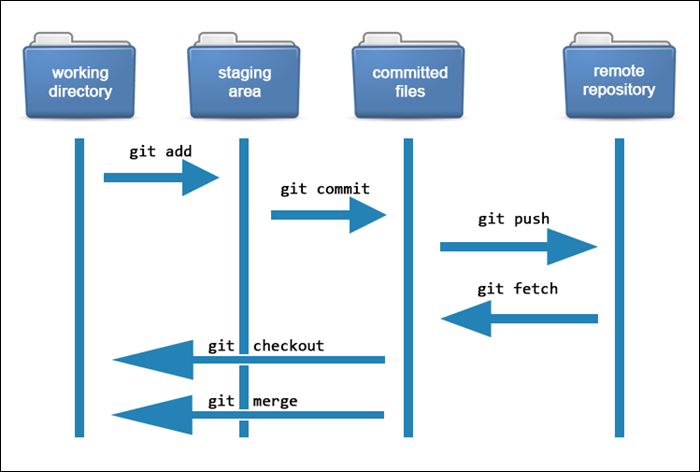
Step-by-step:
You modify a file in the working directory
git add file.txtis executedGit:
Reads file content
Creates a blob object
Stores it in
.git/objects
Updates the index (staging area) to reference the blob
📌 No commit yet.
📌 The change is prepared, not saved permanently.
What Happens Internally During git commit


Step-by-step:
Git reads the staging area (index)
Creates a tree object from staged files
Creates a commit object that:
Points to the tree
Points to the previous commit
Updates branch reference (e.g.,
main)Moves
HEADto the new commit
📌 Now the snapshot is permanent.
Why Git Uses Hashes (Integrity & Trust)
Every Git object is named by a cryptographic hash.
Example:
f374df2a6b...
This ensures:
Data integrity (no silent corruption)
Content verification
Tamper detection
If content changes → hash changes → object identity changes.
Git literally cannot lie about history without breaking hashes.
This is why Git is trusted for:
Open source
Security-sensitive projects
Distributed collaboration
Mental Model Summary (Remember This)
Instead of memorizing commands, remember this flow:
Files → Blobs → Trees → Commits → History
And this truth:
Git is a database of snapshots, not a diff tracker.
Final Thoughts
Understanding Git internals:
Makes you confident during conflicts
Helps you debug weird Git behavior
Separates senior developers from beginners
Makes Git feel logical, not magical
Once this mental model clicks, Git becomes predictable.
Comments
Join the discussionNo comments yet. Be the first to comment.


